

Every promise made inyour business —tracked to completion.
VIRO turns requests, promises and deadlines inside business communication into owned commitments, timely follow-ups and verified outcomes.
Activate your workspace for K100 via MTN MoMo, Airtel Money or Zamtel Kwacha. VIRO Mail, Actions, Brief, Contacts, Calendar and Files are live today.
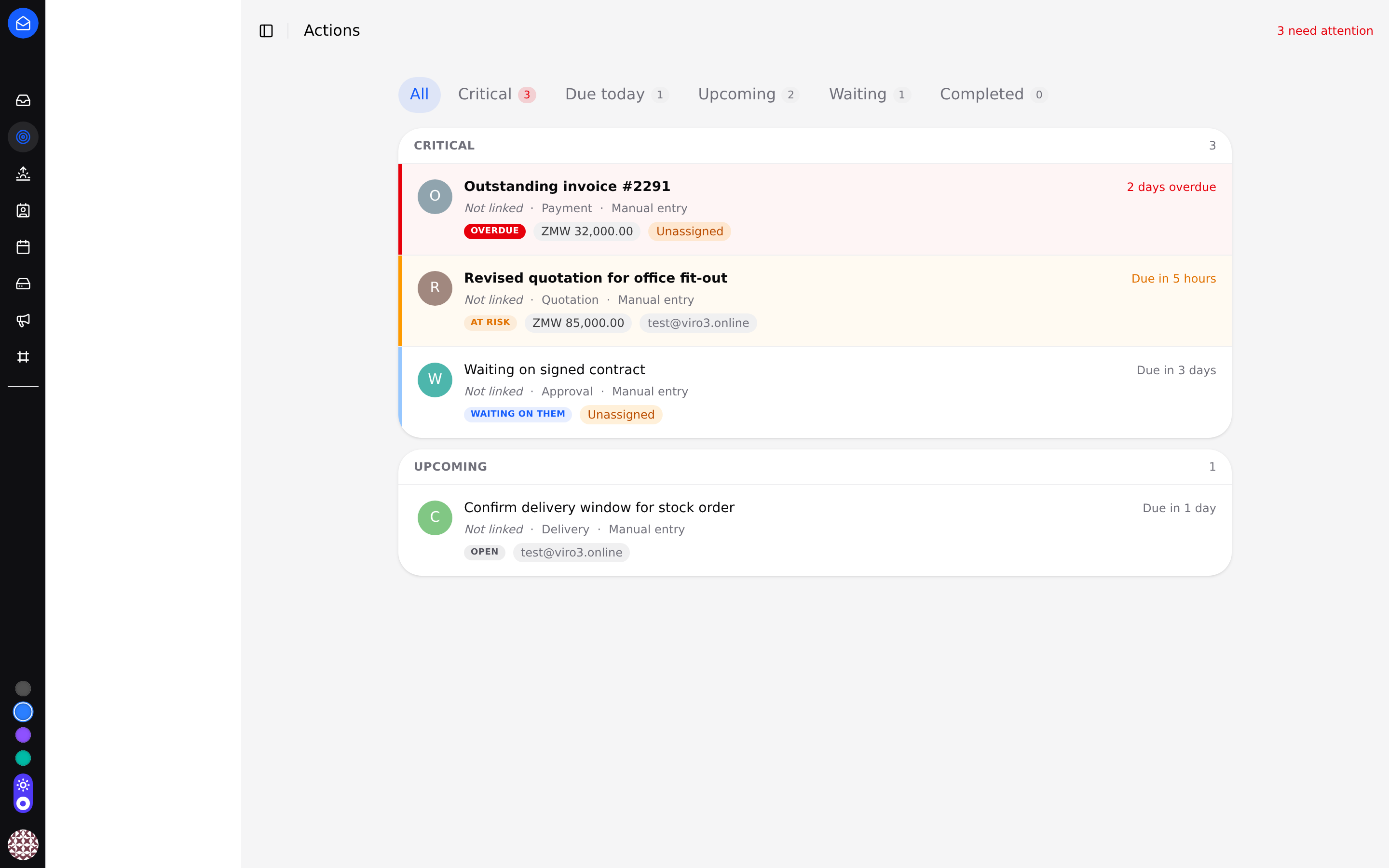
VIRO Actions, recorded from the live product
Customer email: a revised quotation, needed before 15:00.
Tracked with an owner, a deadline and its value.
Ranked critical, at risk, waiting -- impossible to misplace.
Still open near the deadline? The owner hears about it.
The sent quotation is attached as proof of the outcome.
Business is lost between conversation and execution.
A customer makes a request. A manager promises a response. A deadline is mentioned in an email. Traditional communication tools store the message — but they do not make sure the work gets done.
- Stores the message
- Depends on memory
- Hides missed follow-up
- Ends at “sent”
- Recognises the commitment
- Assigns an owner
- Tracks the deadline
- Follows through to an outcome
A row from VIRO Actions -- one commitment, one owner, one deadline. Example data; the interface is the real product.
A customer requests a revised quotation before 15:00.
Follow the same commitment through VIRO -- from the words in an email to a closed, evidenced outcome. This is the whole product in one journey.
The four states a commitment moves through -- the same labels you will see in the product.
Message received
09:12 -- an email lands in VIRO Mail: “Please send the revised quotation for the office fit-out before 15:00 today.”
Request recognised
Someone on the team records it as a commitment -- not a note in a notebook, a first-class object with a type and a customer.
Owner assigned
The commitment gets one named owner. Not a department, not “whoever sees it first” -- a person.
Deadline recorded
Due 15:00 today. The commitment carries the date, not the memory of it.
Risk detected
13:40 and still open -- the commitment moves itself into At risk, ahead of quieter work.
Manager alerted
The escalation policy raises it to the owner's manager before the deadline is missed, not after.
Quotation sent
14:22 -- the revised quotation goes out from the owner's mailbox.
Evidence attached
The sent message is linked to the commitment as evidence of what closed it.
Commitment closed
Completed, timestamped, auditable. What was asked, who owned it, what answered it.
Know exactly what needs action.
Every request, promise and deadline your team records, in one operational view -- ranked by urgency, ownership and status: critical, due today, at risk, upcoming, waiting, completed.
The list opens on what is already late or due today -- the quiet stuff waits its turn.
One commitment, one owner, one deadline -- with the customer and the amount on the same line.
Commitments can carry their Kwacha amount, so “at risk” is a number, not a feeling.
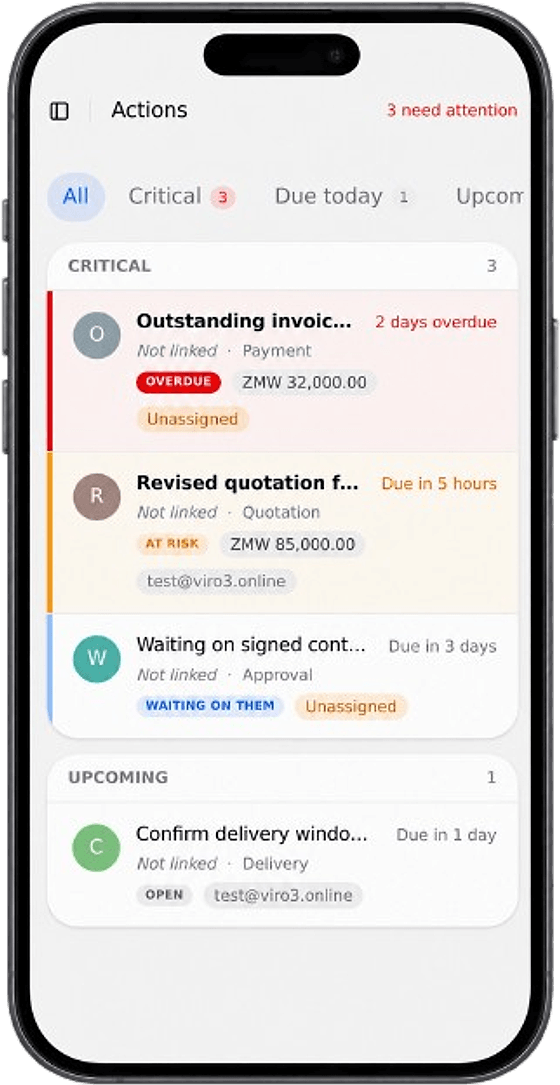
Same commitments, same owners -- on your phone, away from your desk.
From message to verified outcome.
VIRO is not another place to write tasks. It preserves the link between what was communicated, who became responsible, and what completed the commitment.
The request, promise or deadline -- in an email your team sent or received.
Recorded as a first-class object with a type, a customer and, where it has one, a value.
One named person becomes responsible. Roles and membership keep it organisational, not personal guesswork.
The date and time the promise is due -- carried by the commitment, not by memory.
Still open when it matters? The owner's manager is alerted before it slips, under a policy you control.
The sent reply, the quotation, the delivery -- linked to the commitment as proof.
Completed, cancelled or still open -- always with the trail of what happened in between.
Management sees what needs attention before it becomes a problem.
One page, computed live from every open commitment in the workspace. No status meetings required to produce it.
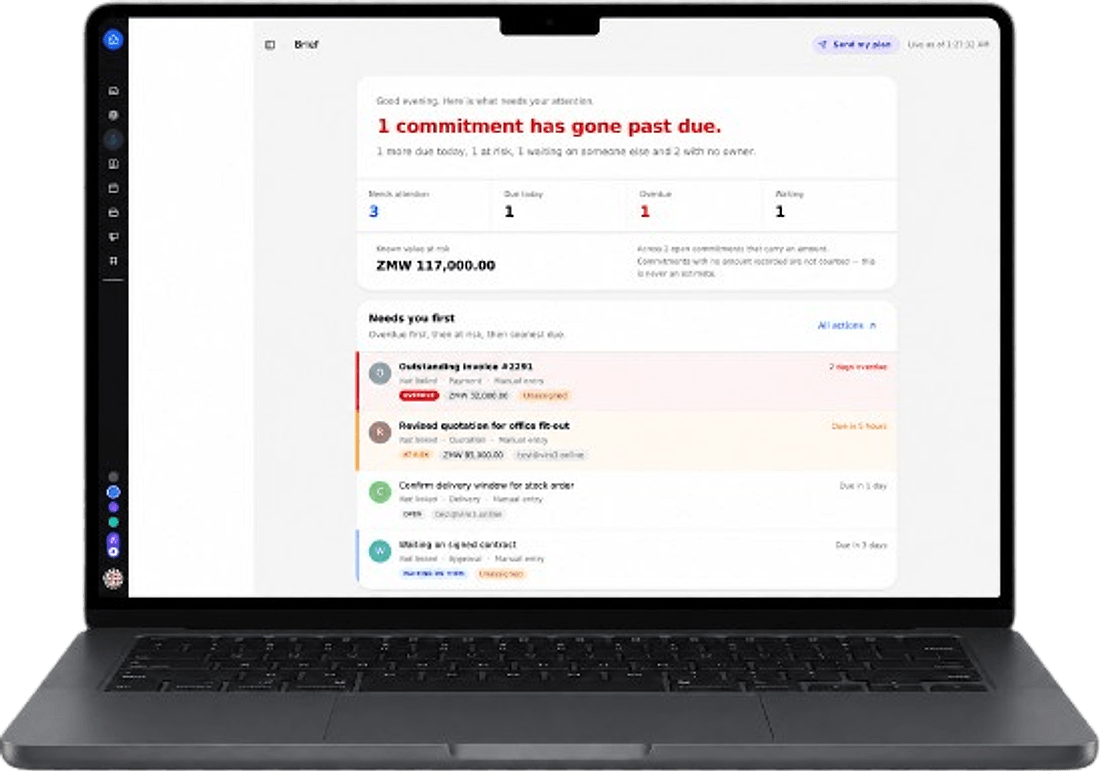
What is already late, by how long, and whose desk it is sitting on.
At-risk and due-today work, ranked ahead of everything else.
The quotations and replies that carry money and are drifting.
Committed and blocked on someone outside the team -- visible, not forgotten.
Commitments can carry amounts; the Brief sums what is at risk -- never an estimate.
Who owns what, and what has already been escalated -- without chasing anyone.
Communication and execution, in the same place.
The VIRO products are not a bundle of disconnected tools. Information moves between them, so the commitment never leaves the system that received it.
Campaigns -- bulk email to your contacts -- sits deliberately apart from transactional business communication: it is a broadcast tool, not a follow-up tool.
A message arrives on your own domain.
The customer behind it is already known.
The commitment appears with an owner and a deadline.
Requests and approvals route as structured records, not stray emails.
Its due date can sit in your working week.
Guests join without an account -- what's said becomes tracked action.
Supporting documents stay attached to the work.
Management sees the risk without asking.
Announcements and newsletters to your contacts -- included from the Business plan up, with a defined monthly send allowance.
For teams that cannot afford missed follow-up.
Every use case runs on the same engine -- a commitment with an owner, a deadline, escalation and evidence.
Sales
Keep quotations, proposals and customer follow-ups visible until an outcome is recorded -- with the deal's value attached, so at-risk revenue is a number management can see in the Brief.
Enquiry → Quotation commitment → Owner → Follow-up → Evidence → Closed
Operations
Track internal requests, delivery commitments and deadlines with a named owner on each one. When a promise to a customer is at risk, the escalation policy finds it before the customer does.
Request → Commitment → Deadline → At risk → Escalation → Done
Customer support
Prevent customer issues from disappearing inside inboxes or informal conversations. Every reported problem becomes an owned commitment with a waiting state -- silence is visible.
Issue reported → Commitment → Owner → Waiting on them → Resolution → Evidence
Management
See overdue, at-risk and waiting commitments across the team without chasing every employee manually. The Brief is computed live, with value at risk and escalation status on one page.
Open Brief → Overdue / at risk / waiting → Value at risk → Act
Accountability has to be provable.
Only capabilities that are implemented and verifiable in the running system are listed here. No certifications we have not earned, no controls we have not built.
TLS on every mail and web connection, with certificates issued automatically.
Sensitive credentials stored under AES-256-GCM envelope encryption.
Owner, admin and member roles on every workspace -- enforced server-side.
An append-only event record: created, owned, reminded, escalated, closed.
Your domain's mail is authenticated with all three, set up with you during onboarding.
Any message downloadable as its original .eml file, attachments included.
Two-factor authentication, account self-service recovery and bulk workspace export are not part of the platform today, so they are not claimed here. Account access today is password-based, with workspace roles governing what each member can do.
Flat workspace pricing. No per-seat bill.
Every plan includes VIRO Mail on your own domain, Contacts, Calendar, Files, team roles and a full per-commitment audit trail. Pick the capacity and the accountability level you need.
One currency shown at a time. Every plan is priced in USD. The Kwacha amount is what mobile money actually collects. Conversion rate K19 = $1, reviewed periodically.
Start
Entry-level professional operating environment.
- 5 mailboxes on your domain
- 15 GB storage
- Manual commitment tracking (up to 15 open)
- Contacts, Calendar, Files
Business
Organize and coordinate your team.
- 12 mailboxes, 50 GB storage
- Commitments, delegation, Actions + Brief
- Core workflows — internal forms
- Meetings, Calendar, Contacts, Files
- Campaigns -- 1,000 sends/mo
Intelligence
Most popularExecute, automate and understand your organization.
- 25 mailboxes, 100 GB storage
- Automated follow-up + escalation
- Workspace reporting
- Campaigns -- 3,000 sends/mo
- 500 SMS/mo allotment*
Executive Command
See and run your organization from one command environment.
- 50 mailboxes, 250 GB storage
- Executive Command for managers
- Advanced workflows / Approvals
- Organization-wide reporting
- Your own escalation policy
- Campaigns -- 10,000 sends/mo
- 1,500 SMS/mo allotment*
Enterprise
Negotiated users, storage, AI, meetings, VoIP, SMS, support, deployment, integrations and security for large institutions. Not a self-serve checkout — we set users, storage, AI, meetings, VoIP, SMS, support and deployment with you.
Start VIRO for K100. That activates your workspace today; your plan's rate above applies from your first full billing cycle, confirmed with you directly before anything else is charged -- VIRO does not auto-charge on a schedule.
*SMS and VOIP allotments and add-ons aren't self-serve yet -- no provider is wired up, so we enable them with you directly once you're set up.
Commitments are tracked by your team today -- automatic detection of requests and deadlines from your inbox is not switched on yet, so it is not listed as a plan feature above.
Compare every plan in detail
| Start K190 /mo | Business K950 /mo | Intelligence K1,900 /mo | Executive Command K5,700 /mo | |
|---|---|---|---|---|
| Mailboxes | 5 | 12 | 25 | 50 |
| Storage | 15 GB | 50 GB | 100 GB | 250 GB |
| Commitment tracking | Basic -- manual tracking, capped at 15 open | Full -- unlimited manual tracking, Actions + Brief | Automated -- follow-ups, escalation, evidence | Automated -- follow-ups, escalation, evidence |
| Management Brief | ||||
| Workspace reporting | ||||
| Executive Command | ||||
| Escalation policy control | ||||
| Bulk email (Campaigns) | Not included | Included, up to 1,000/mo | Included, up to 3,000/mo | Included, up to 10,000/mo |
| Bulk SMS | Not included | Pay-as-you-go add-on | 500/mo included | 1,500/mo included |
| VOIP | Not included | Pay-as-you-go add-on | Pay-as-you-go add-on | Pay-as-you-go add-on, priority routing |
| Support | Standard email | Priority email | Priority + fast-response SLA | Dedicated account contact |
Per-seat pricing charges you for the team you already have.
We do not publish competitors' exact prices here -- they change, they vary by region, and a stale number helps nobody. Check their own pricing pages for current figures. What matters is the model:
- Google WorkspacePer-seat monthly billing
Document editor, spreadsheets and meetings included.
- Microsoft 365Per-seat monthly billing
Document editor, spreadsheets and meetings included.
- Zoho WorkplacePer-seat monthly billing
Document editor, spreadsheets and meetings included.
The bill grows with every mailbox -- and following up on a promise is still left to memory.
- Flat workspace capacityNot per seat
Mailboxes, storage and accountability in one plan price.
- Commitment tracking included
Owners, deadlines, escalation and evidence -- on the same mail your business runs on.
To be fair to them: Google Workspace and Microsoft 365 include document editors, spreadsheets and video meetings that VIRO does not replace. VIRO connects professional communication to accountable execution, and charges by workspace capacity rather than silently allowing follow-up to disappear.
From signup to first commitment.
Domain setup and mailbox creation are done with the VIRO team directly during onboarding -- there is no automated migration service to wrestle with, and nothing is promised beyond what happens here.
Choose your plan
Pick a tier and billing cadence on the Start page. The plan you choose is recorded with your workspace from the first minute.
Activate for K100
Approve the mobile-money prompt on your phone (MTN MoMo, Airtel Money or Zamtel Kwacha). Your workspace is created the moment payment is confirmed.
Connect your domain
The VIRO team sets up mail for your business domain with you -- MX, SPF, DKIM and DMARC records at your DNS host.
Create mailboxes and roles
Professional addresses for your people, with owner, admin and member roles from day one.
Bring your contacts
Add contacts individually or sync them via CardDAV, so customers behind your commitments are known by name.
Start tracking commitments
Record the requests, promises and deadlines already sitting in your inbox -- and open the Brief.
Questions worth asking before you start.
Is VIRO only an email service?
No. VIRO Mail -- professional email on your own domain -- is the foundation, and it is live today. On top of it sit VIRO Actions (the commitment list your team works from) and VIRO Brief (the management overview), plus Contacts, Calendar and Files. Bulk email campaigns are included from the Business plan up.
Can we use our own business domain?
Yes -- that is the default. You give us your domain at signup; mail for it is hosted on VIRO's mail infrastructure (mx.viro3.online) with SPF, DKIM and DMARC set up with you during onboarding.
How are mailboxes counted?
They are not billed individually. Each plan is flat workspace capacity: 5 mailboxes on Starter, 12 on Business, 25 on Premium, 50 on Enterprise -- one plan price, however you spread the mailboxes across your people.
What is a commitment?
Any request, promise or deadline you record in VIRO: what was asked, who owns it, when it is due, what it is worth, and -- once it closes -- the evidence of what answered it. Commitments move through states like at risk, overdue and waiting, and every change is written to an append-only audit trail.
What is the difference between Actions and Brief?
Actions is the working view for the people doing the work -- one operational list ranked by urgency and ownership. Brief is the management view -- overdue, at-risk and waiting commitments across the team, with value at risk and escalation status, computed live. Brief is included from Business up.
Can we export our data?
Any message can be downloaded as its original .eml file with attachments. There is no one-click bulk workspace export yet -- that is an honest limitation, not a lock-in strategy.
How do billing currencies work?
Starter is priced in Kwacha. Business, Premium and Enterprise are anchored in US dollars, and what mobile money actually collects is the Kwacha equivalent at a documented, periodically reviewed rate (currently K19 = $1). The pricing section has a currency switch so you can view everything in one currency at a time.
Are SMS and VOIP included or charged separately?
They are plan entitlements, not yet self-serve: Premium and Enterprise carry included monthly SMS allotments, and VOIP is a pay-as-you-go add-on. No provider is wired up yet, so both are enabled with you directly rather than through a toggle in the app.
What happens when we change plans?
Your plan and billing cadence are recorded at signup and set up with you directly -- VIRO has no automated recurring billing, so nothing is ever charged silently. Upgrades and downgrades are arranged with the team and take effect by agreement.
What support is available during setup?
Domain connection, DNS records and mailbox creation are done with the VIRO team directly. After that, support is tiered: standard email response on Starter, priority email on Business, a fast-response SLA on Premium, and a dedicated account contact on Enterprise.
Your business already made the promise.
VIRO makes sure it gets done.
Bring professional communication, responsibility and follow-through into one accountable workspace.